

FlowPilot Lab · 供应链计划与决策平台FlowPilot Lab · Supply-chain planning platform
把"月度补货 → 周度发货"这套原本靠表格计算的流程,做成每个数字都能追溯来源的平台。I turned a spreadsheet-driven "monthly replenishment → weekly shipment" process into a platform where every number can be traced to its source.
项目背景CONTEXT
基于供应链实习中接触的业务,把逻辑沉淀下来。供应链计划常见三个难题:数据分散在多张表格里,计划结果说不清是怎么算的,异常往往事后才发现。Built on what I saw in my supply-chain internship. Planning teams face three problems: data scattered across spreadsheets, results nobody can explain, and issues found only after they hurt.
项目成果OUTCOME
- 打通需求预测到周度发货的完整闭环End-to-end loop from demand forecast to weekly shipments
- 任意 SKU 可逐步追溯公式、输入和重算结果Any SKU can be traced step by step: formula, inputs, recomputed value
- 开源并附中英双语说明、计算链路图和规则文档Open-sourced with bilingual docs, a chain diagram and the calculation rules
我做了什么WHAT I DID
- 拆业务流程:拆成字段定义、业务规则和页面需求,覆盖风险发现、月度计划、周度履约、查询追溯 4 个环节。Process design: broke the workflow into field definitions, business rules and page requirements across risk detection, monthly planning, weekly fulfilment and traceability.
- 造数据、验系统:演示数据覆盖 5 个渠道、6 个产品分类、18 个 SKU;测试场景参考实习中的设计,模拟缺货、到货延迟、库存积压等情况。Data and testing: demo data spans 5 channels, 6 categories and 18 SKUs; scenarios modelled on my internship test design cover stock-outs, late arrivals and overstock.
- 查问题、修问题:抽样复算修正预测口径、汇率换算和回溯逻辑;核对数据发现两处隐藏口径错误,误判的异常 SKU 从 18 个降到 8 个。Finding and fixing: sample recalculations corrected forecast, FX and trace logic; reconciliation exposed two hidden definition errors, cutting falsely flagged SKUs from 18 to 8.
- 脱敏与重构:内部编码统一换成通用业务术语,改动 212 个文件,31 张表、2,267 行结果逐字段一致。Refactor: replaced internal codes with generic business terms across 212 files; all 31 tables and 2,267 rows matched field by field.
该如何判断优先级?How do you decide what comes first?
- 起初我想尽量完整地还原业务规则,把预测需求、现有库存、在途数量、交付周期、经销商优先级都算进去,让结果更精确。At first I tried to model every business rule (forecast demand, stock on hand, in-transit quantities, lead times, dealer priority) to make results as precise as possible.
- 测试中我发现,算对了不等于用户会用。系统只给出一个建议采购量,却说不清这个数是怎么来的,用户就很难信任它。Testing showed that a correct number isn't the same as a usable one. If the system gives a suggested order quantity without explaining where it came from, users won't trust it.
- 所以我把重心转向可解释性:每个建议都能下钻查看相关的库存、需求和在途数据,并看到异常情况如何影响这个建议。So I shifted the focus to explainability: every suggestion drills down to the related stock, demand and in-transit data, and shows how exceptions affect it.
如果重做,我会怎么改What I'd do differently
- 更早引入真实用户:先只做一个最核心的场景,比如“库存不足时怎么定补货计划”,做出最小可用版本,再根据反馈扩展其他模块,而不是先把功能做全。Bring in real users earlier: start with one core scenario, such as planning replenishment when stock runs short, ship a minimum usable version, then expand based on feedback instead of building everything first.
- 验证“有没有用”,而不只是“算没算对”:看用户能不能快速看懂建议、据此完成决策,以及系统是否真的减少了重复分析的工作量。Validate usefulness, not just correctness: can users understand a suggestion quickly, make a decision with it, and does the system actually cut repetitive analysis?
业务流程图:系统实际处理的范围PROCESS DIAGRAMS: WHAT THE SYSTEM ACTUALLY HANDLES
从 5 类数据源出发,每个字段的公式和两个关键判断:静态还是动态目标、是否超出配额From five data sources to the final quantity, with each field's formula and the two key decisions: static vs dynamic target, and whether the quota is exceeded
6 条规则分两个级别,按 SKU 去重后汇总到异常中心和健康率Six rules at two levels, de-duplicated by SKU into the exception center and health rate
月度规划到周度执行的整体链路The chain from monthly planning to weekly execution
月度补货的完整分支Full branching for monthly replenishment
周度配货的完整分支Full branching for weekly allocation
流程图来自项目 GitHub 文档,与代码中的计算规则一一对应 · 点击放大 · 手机可左右滑动Diagrams come from the project docs on GitHub and match the rules in the code · tap to zoom · swipe on mobile
左右滑动 · 点击放大 · Swipe · tap to zoom · 驾驶舱 · 数据看板 · 单 SKU 计算追溯(演示数据)Cockpit · dashboard · per-SKU calculation trace (demo data)
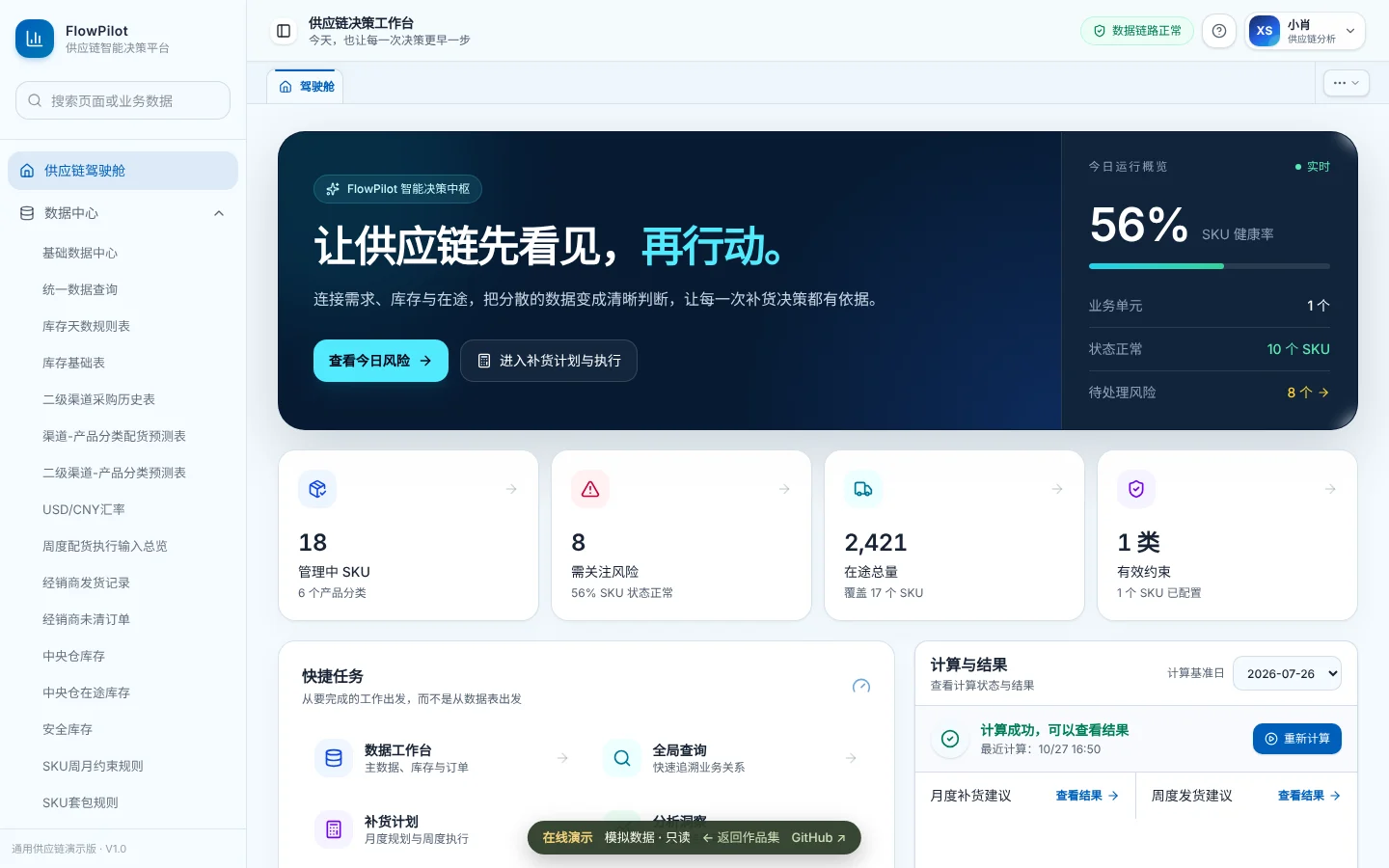
在线 Demo:打开即可体验Live demo: open and click around
无需安装和数据库,使用模拟数据,只读体验。No install or database. Demo data, read-only.
打开在线 DemoOpen live demo ↗